Introduction to C
Writeup on how to start thinking in programs and C syntax
Hey everyone, if you are on this page, you are either:
- taking CS1010
- learning to code in C
- my friends trolling my comments section
Either way, your purpose is clear and hopefully I don’t have to convince you why we are learning C!
In this series, I hope to discuss C standard in both a high and low level; teaching you how C code works in your head and also in the computer. I will also be sharing some exam tips and how to better visualise and understand code in general.
If you do not want to read the long in-depth explanations, you are encouraged to refer to my summaries!
Hopefully by the end of this article series, you will be able to understand C (to some extent) and score well for your exams!
Content Overview:
- Introduction to C
- Format Specifiers
- Variables
- Bits and Bytes
- Integer Overflow
- Arithmetic Operators and Assignment Operators
- Summary
- Tips
- Exam Questions
Introduction to C
Let’s take a look at what C programs usually look like:
1
2
3
4
5
1. #include <stdio.h>
2.
3. int main(void){
4.     printf(“Hello World!\n”);
5. }
If you are a complete beginner, or have only coded with python before, I am sure this code may look slightly foreign to you! Don’t worry, I will go through the code line by line with you!
Line 1: #include <stdio.h>
- We are including the C “standard input/output” library here!
stdio.his a header file which contains most of your important functions that you usually use while coding- Some of these functions are:
printf(including format specifiers like%f,%s, etc)sscanfgetcharfopen
Line 3: int main(void)
- This is fundamentally a function declaration (we will delve deeper into functions later on)
- We are essentially declaring the main function to the compiler
- Why have a main function?
- It is good for you to organise your own thoughts
- More importantly, the computer (specifically the OS and the linker) needs a fixed starting address, which is the main function
- When you run your compiled code, the OS sets up the memory, loads your program, and then jumps directly to the first instruction inside main
💡 CS1010 Tip: It is considered “Best Practice” in C to use void because it makes your code more type-safe. It prevents accidental data from being passed where it isn’t wanted.
Line 4: printf(“Hello World!\n”);
- We are calling the printf function which ouputs anything you write in the brackets!
- Make sure that you wrap your text in “”
- We will cover how to add variables in your output later
\nmeans new line. In C, the output does not automatically move to the next line after outputting the given text/values, so you will have to do it for them!
- This line of code will output
Hello World!
💡 CS1010 Tip: Remember to end your statements with ;
What if you want to print something that is not determined yet? How do we print 2 * 3? Sure we can do this simple calculation in our heads right now, but what if the numbers get very complicated?
The solution is to use the computer to do the calculation for you! Save your brain power for more complicated tasks later on!
Format Specifiers
In this program, we are trying to calculate the tax of a good worth $888. If the tax is 9%, then the total tax value should be 888 * 9/100! Simple math!
How do we output the value though? Would the following example work?
printf("Tax (cents): 888 * 9 / 100");
The answer is no! As said previously, printf will output everything wrapped in “”. This means that it would not consider the math operation you wrote down and just directly print it! The output will therefore be:
Tax (cents): 888 * 9 / 100
How you may ask, should we output the calculated value? The answer is format specifiers.
1
2
3
4
5
1. #include <stdio.h>
2.
3. int main(void){
4.     printf("Tax (cents): %d\n", 888 * 9 / 100);
5. }
Line 4: printf("Tax (cents): %d\n", 888 * 9 / 100);
- We have a format specifier
%dand we have also left the calculations outside of the “text”- Format specifiers are a form of placeholders that tell the compiler what type of data to expect and in what position
- In this example, the
%dspecifier represents an integer data type, and therefore expects an integer argument - The argument is placed outside of the “text” in respective positions according to the positioning of the format specifiers.
- This code will now output:
Tax (cents): 79
Format Specifiers are a great way to output any unknown variable or calculations that you may have in your code. It is also very helpful in print debugging. In CS1010, it is expected knowledge after week 1 so definitely try to familiarise yourself with it!
Here are some of the format specifiers that we frequently use:
| Specifier | Data Type | Description | Example Output |
|---|---|---|---|
%d or %i | int | Signed decimal integer | 42, -15 |
%u | unsigned int | Unsigned decimal integer | 42 |
%zu | size_t | Unsigned integer representing memory size | 40, 8 |
%f | float or double | Decimal floating-point | 3.141590 |
%c | char | Single character | 'A' |
%s | char[] or char* | String of characters | "Hello" |
%p | void * | Pointer (memory address) | 0x7ffee1b2c |
%x or %X | unsigned int | Unsigned hexadecimal | 2a, 2A |
Variables
Lets refer back to the last example:
1
2
3
4
5
1. #include <stdio.h>
2.
3. int main(void){
4.     printf("Tax (cents): %d\n", 888 * 9 / 100);
5. }
The code looks very messy! If we have to input the calculation into the printf function every single time, there will be a lot of wasted energy typing. In the practical exam, we should be coding efficiently and effectively!
So lets try to make our code cleaner! We can do that by using variables.
Variables are named data storage containers for your data. They are able to hold any data types as long as it is declared beforehand.
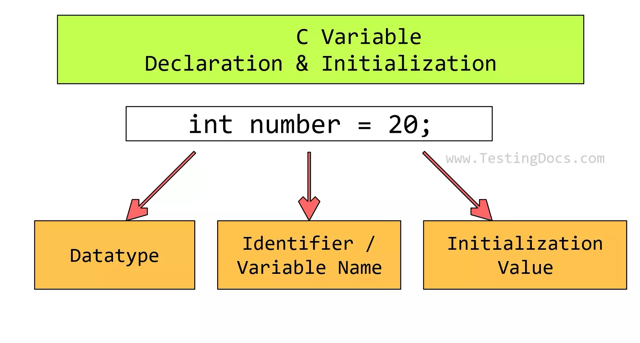
C Variable Declaration
<type> <variable name>;
Example:
int x;float y;double z;
C Variable Initialization
<variable name> = <expression>;
Example:
x = 5;y = 5.0;
You can declare a variable and initialize it at the same time!
int x = 3;
You can also declare multiple variables at once, but be careful when initializing them!
int x, y, z;int x, y, z = 5only setsz = 5!
If you want to declare and initialize all of them in one line, you can do this: int x = 5, y = 6, z = 7;
Variable Naming Restrictions
Obviously there are some restrictions to how you name your variables. This is so that the compiler is able to accurately identify what is a variable. So what is the naming convention?
Allowed characters: letters, digits, and underscore (eg. no spaces)
- OK:
test,test123,test_123, etc - NOT OK:
test 123,t@est, etc
Start of a variable: letter or underscore
- C discourages names starting with underscores as those identifiers are “reserved to the implementation” per the C standard (meaning used by the C library, or rarely by the compiler itself)
- NOT OK:
123test,@test, etc
Not a reserved word or keyword (eg. int/double)
- NOT OK:
double double,int int, etc
Now lets see this in action! Here is an example:
1
2
3
4
5
6
7
8
1. #include <stdio.h>
2.
3. int main(void){
4.     int product_cost = 888;
5.     int gst_rate = 9;
6.     int tax = product_cost * gst_rate / 100;
7.     printf("Tax (cents): %d\n", tax);
8. }
Line 4: int product_cost = 888;
- We are declaring an integer variable named
product_costand assigning the value888to it product_costwill now hold/ represent888
Line 5: int gst_rate = 9;
- We are declaring an integer variable named
gst_rateand assigning the value9to it gst_ratewill now hold/ represent9
Line 6: int tax = product_cost * gst_rate / 100;
- We are declaring an integer variable named
taxand assigning the valueproduct_cost * gst_rate / 100to it- Your computer will convert the variables to the value it is representing and calculate this for you!
product_cost * gst_rate / 100=== (is equivalent to)888 * 9 / 100
taxwill now hold/ represent888 * 9 / 100or79
💡 CS1010 Tip: Try to understand each statement with the specific choice of language that I have used to describe it
Line 7: printf("Tax (cents): %d\n", tax);
- Now our printf statement is a lot cleaner to read!
Variable Types
What if we want to be more accurate in our gst calculation? Ideally, we would want to include some decimal points right? But integers cannot hold decimal points, so we will have to use a different data type for decimal numbers.
1
2
3
4
5
6
7
8
1. #include <stdio.h>
2.
3. int main(void){
4.     double product_cost = 888;
5.     double gst_rate = 9;
6.     double tax = product_cost * gst_rate / 100;
7.     printf("Tax (cents): %f\n", tax);
8. }
Line 4: double product_cost = 888;
- We are declaring a double variable named
product_costand assigning the value888to it - Even though we assigned it to be
888, it will actually hold/represent888.0
Line 6: double tax = product_cost * gst_rate / 100;
- The tax variable now holds the calculation including decimal points!
tax = 79.920000
Bits and Bytes
Now that we have some practice with using variables and data types, we need to consider the pros and cons of each data type. Have you ever thought about how your computer memory works? How much space a data type takes up? What happens when the size of your data is larger than the data type you are using?
💡 CS1010 Tip: This part is very often tested in exams and is quite tricky! Your computer’s memory is made up of a very large number of tiny storage units. The smallest unit is called a bit (short for binary digit).
A bit can only store one of two values:
0 or 1
You can think of a bit like a switch - it is either off (0) or on (1).
Modules like CS2100 (or its CG equivalent) will explore this further at the hardware level. For now, we only need a high-level understanding.
How Can Only 0 and 1 Represent Everything?
If a bit can only hold two values, how can we represent numbers like 6? Or 42? Or even text? The truth is computers don’t use just one bit — they use groups of bits.
When we write numbers using only 0 and 1, we are writing them in binary, also known as base2.
In base10 (decimal), each digit represents a power of 10:
345 = 3×100 + 4×10 + 5×1
This representation is what you are normally familiar with (I hope).
In base-2 (binary), each digit represents a power of 2:
The rightmost bit is 2⁰
Next is 2¹
Then 2²
Then 2³0 0 0 0
2³ 2² 2¹ 2⁰
Each bit acts like a switch:
If the bit is 1 → we “take” that power of 2.
If the bit is 0 → we “don’t take” it.
We use 0b to represent base2 / binary representation. Similarly, we use 0d to represent base10 / decimal and 0x to represent base16 / hexadecimals.
Think about it: How would you convert binary to hexadecimals and vice versa?
💡 CS1010 Tip: 1 byte = 8 bits
Self Exercise
Represent 67 in binary
Click to reveal answer
The answer is 0b01000011.Represent 129 in binary
Click to reveal answer
The answer is 0b10000001.Represent 255 in binary
Click to reveal answer
The answer is 0b111111111.Every one of our data types have a set amount of bits and bytes assigned to them! It is important to know the limits of your data types!
Here is a breakdown of the standard C data types, assuming a typical 64-bit environment:
| Variable Type | Size (Bytes / Bits) | Range |
|---|---|---|
char | 1 byte / 8 bits | -128 to 127( -(27) to 27 - 1 ) |
int | Min 2 bytes. Generally 4 bytes / 32 bits | -2,147,483,648 to 2,147,483,647( -(231) to 231 - 1 ) |
unsigned int | Min 2 bytes. Generally 4 bytes / 32 bits | 0 to 4,294,967,295( 0 to 232 - 1 ) |
long | Min 4 bytes. Generally 8 bytes / 64 bits | -9,223,372,036,854,775,808 to 9,223,372,036,854,775,807( -(263) to 263 - 1 ) |
unsigned long | Min 4 bytes. Generally 8 bytes / 64 bits | 0 to 18,446,744,073,709,551,615( 0 to 264 - 1 ) |
long long | 8 bytes / 64 bits | -9,223,372,036,854,775,808 to 9,223,372,036,854,775,807( -(263) to 263 - 1 ) |
💡 CS1010 Tip: Always use double for anything needing decimal points instead of float! Modern computers have plenty of memory to handle the 8 bytes, and the extra precision prevents weird rounding errors in your calculations.
Integer Overflow
We have now represented each data type with the amount of bits that they hold. This also shows the range of values that they can hold. For example integers can only hold ( -(231) to 231 - 1 ).
So what happens when we add 1 to an integer at maximum value (231 - 1)? The integer will overflow and the value will now be reseted to represent the minimum value an integer can hold (-231).
Similarly, when we subtract 1 from an integer at minimum value (-231), the integer will now represent (231 - 1).
Self Exercise
An 8-bit unsigned integer can store values from 0 to 255.
What happens if we compute: 255 + 1 ?
Click to reveal answer
The result is 0. Unsigned integers wrap around when they exceed their maximum value. 255 + 1 = 256, but since the maximum is 255, it wraps back to 0.What is the result of: 250 + 10 ?
(Assume 8-bit unsigned integer)
Click to reveal answer
250 + 10 = 260. Since the maximum is 255, it wraps around. 260 − 256 = 4 So the result is 4.An 8-bit signed integer can store values from -128 to 127.
What happens if we compute: 127 + 1 ?
Click to reveal answer
The result becomes -128. When the maximum value (127) is exceeded, it wraps around to the minimum value (-128).What is the result of: -128 - 1 ?
(Assume 8-bit signed integer)
Click to reveal answer
The result becomes 127. When we go below the minimum value (-128), it wraps around to the maximum value (127).What is the result of: 100 + 40 ?
(Assume 8-bit signed integer)
Click to reveal answer
100 + 40 = 140. But the maximum signed value is 127. 140 − 256 = -116 So the result is -116.💡 CS1010 Tip: You can think of overflowing as the value looping around to the other side of the range.
Arithmetic Operators and Assignment Operators
Summary
Format Specifiers
Summary of Format Specifiers:
| Specifier | Data Type | Description | Example Output |
|---|---|---|---|
%d or %i | int | Signed decimal integer | 42, -15 |
%u | unsigned int | Unsigned decimal integer | 42 |
%zu | size_t | Unsigned integer representing memory size | 40, 8 |
%f | float or double | Decimal floating-point | 3.141590 |
%c | char | Single character | 'A' |
%s | char[] or char* | String of characters | "Hello" |
%p | void * | Pointer (memory address) | 0x7ffee1b2c |
%x or %X | unsigned int | Unsigned hexadecimal | 2a, 2A |
Variable Types
Summary of Variable types:
| Variable Type | Size (Bytes / Bits) | Range |
|---|---|---|
char | 1 byte / 8 bits | -128 to 127( -(27) to 27 - 1 ) |
int | Min 2 bytes. Generally 4 bytes / 32 bits | -2,147,483,648 to 2,147,483,647( -(231) to 231 - 1 ) |
unsigned int | Min 2 bytes. Generally 4 bytes / 32 bits | 0 to 4,294,967,295( 0 to 232 - 1 ) |
long | Min 4 bytes. Generally 8 bytes / 64 bits | -9,223,372,036,854,775,808 to 9,223,372,036,854,775,807( -(263) to 263 - 1 ) |
unsigned long | Min 4 bytes. Generally 8 bytes / 64 bits | 0 to 18,446,744,073,709,551,615( 0 to 264 - 1 ) |
long long | 8 bytes / 64 bits | -9,223,372,036,854,775,808 to 9,223,372,036,854,775,807( -(263) to 263 - 1 ) |
Tips
💡 It is considered “Best Practice” in C to use void because it makes your code more type-safe. It prevents accidental data from being passed where it isn’t wanted.
int main(void)
💡 Remember to end your statements with ;
💡 1 byte = 8 bits
💡 Always use double for anything needing decimal points instead of float! Modern computers have plenty of memory to handle the 8 bytes, and the extra precision prevents weird rounding errors in your calculations.
💡 You can think of overflowing as the value looping around to the other side of the range.